Chapter 1: Introduction to AI in Music
The world of music is undergoing its most revolutionary transformation since the invention of the electric guitar or the birth of digital recording. Today, anyone with a smartphone and an internet connection can compose, arrange, and produce professional-sounding music using artificial intelligence - no musical training required, no expensive equipment needed. This isn't science fiction; it's the reality of AI music production in 2025.
What is AI Music Production? Simple Analogies like AI as Your Digital Bandmate
AI music production represents the marriage of artificial intelligence technology with musical creativity, where machine learning algorithms act as collaborative partners in the songwriting and production process. Think of AI as your infinitely patient, incredibly talented digital bandmate - one who never gets tired, never runs out of ideas, and can play every instrument imaginable.
Unlike traditional music production, which requires years of training in music theory, instrumental proficiency, and technical skills, AI music production democratizes the creative process. When you describe a mood, genre, or musical idea in plain English, AI algorithms analyze vast databases of musical patterns, structures, and styles to generate original compositions that match your vision.
The process works similarly to how you might describe a scene to an artist who then paints it for you. You might say, "Create a melancholic indie folk song about leaving home," and within seconds, an AI system like Suno or Udio will generate complete tracks with vocals, instruments, lyrics, and professional-quality arrangements. The AI doesn't just create random noise - it produces music that sounds authentically human, complete with emotional resonance and genre-appropriate stylistic elements.
Why AI? Benefits for Beginners - Speed, Creativity Without Instruments
The appeal of AI music production for beginners lies in its ability to eliminate traditional barriers to musical creation. Here are the key advantages that make AI particularly powerful for newcomers:
Speed and Instant Gratification: Traditional music production can take months or years to master. With AI, you can go from initial concept to finished track in minutes. This rapid iteration allows beginners to experiment freely, learning through immediate feedback rather than struggling through tedious technical processes.
No Instrumental Requirements: Perhaps the most liberating aspect of AI music production is that it requires no musical instruments, no knowledge of chord progressions, and no understanding of complex music theory. Your voice, describing what you want to create, becomes your primary instrument.
Infinite Creative Possibilities: AI tools can generate variations across virtually every musical genre and style. Whether you're interested in creating electronic dance music, classical compositions, hip-hop beats, or experimental soundscapes, AI can provide the foundation for exploration. This breadth allows beginners to discover their musical preferences without committing to expensive equipment or lengthy training.
Learning Through Creation: Rather than spending years learning theory before making music, AI allows beginners to create first and understand later. This reversed learning process keeps motivation high and provides immediate creative satisfaction while gradually building musical knowledge through hands-on experience.
Cost-Effective Entry Point: Professional music production traditionally required thousands of dollars in equipment, software, and studio time. Many AI music platforms offer robust free tiers, with premium features available for modest monthly subscriptions. This accessibility means financial constraints no longer prevent creative exploration.
Quick History: From Early Synths to 2025's Generative Tools
The journey from early electronic instruments to today's AI music generators represents a fascinating evolution of technology and creativity. Understanding this progression helps contextualize just how revolutionary current AI tools truly are.
The Electronic Music Pioneers (1920s-1950s)
The roots of AI music trace back to early electronic instruments like the Theremin (1920) and Ondes Martenot (1928), which used electronic frequencies to create otherworldly sounds. These instruments demonstrated that music could be created through electronic manipulation rather than traditional acoustic means. The RCA Music Synthesizer (1955) was actually the first instrument to call itself a "synthesizer," using punched paper tape to control sound generation - an early form of automated composition.
The Synthesizer Revolution (1960s-1970s)
Robert Moog's modular synthesizer system in the 1960s marked the beginning of modern electronic music production. These instruments used voltage-controlled oscillators and filters to create and shape sounds, establishing the foundation for electronic music. The 1970s brought more accessible instruments like the Minimoog and the introduction of polyphonic capabilities, allowing musicians to play multiple notes simultaneously.
The Digital Age and MIDI (1980s)
The introduction of MIDI (Musical Instrument Digital Interface) in 1983 revolutionized music production by enabling different electronic instruments to communicate with each other. This standardization allowed for complex multi-instrument arrangements and the beginning of computer-based music production. Digital synthesizers like the Yamaha DX7 made electronic music creation more affordable and accessible.
Ray Kurzweil and Stevie Wonder: A Pivotal Partnership
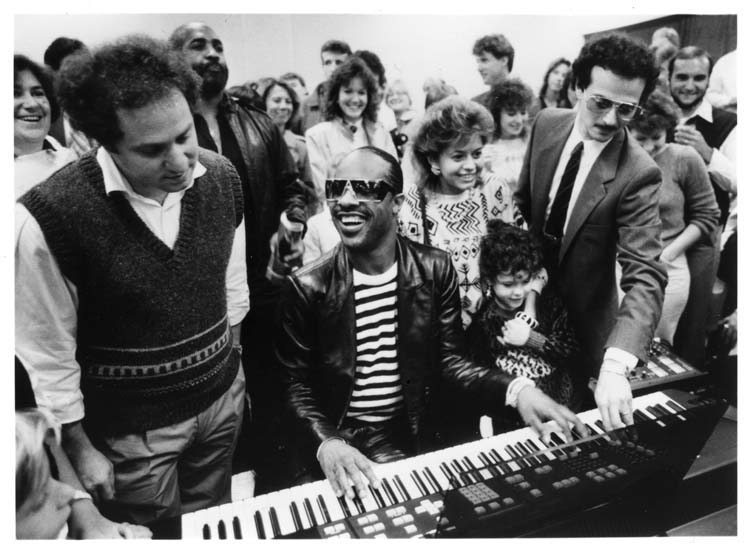
The mid-1980s marked a turning point with Ray Kurzweil's K250, revealed in early 1984 amid the era's digital boom. Inspired by Stevie Wonder's 1982 challenge, it pioneered realistic sampled sounds, foreshadowing AI's generative capabilities.
Stevie Wonder's Role: Key Facts
Stevie Wonder wasn't just a user - he was a driving force behind Kurzweil's advancements. Their partnership started in 1976 when Kurzweil provided Wonder with the first Kurzweil Reading Machine for the Blind, sparking a decades-long friendship. In 1982, Wonder challenged Kurzweil to create a synthesizer that could replicate a grand piano authentically, leading to the K250's development (launched in 1984). Wonder served as musical advisor for Kurzweil Music Systems, collaborating on prototypes and even joining launches (e.g., at NAMM 2010 for later models). This partnership emphasized accessible technology, as Wonder (who is blind) influenced user-friendly designs, blending AI-like algorithms with sampling for realistic sounds.
Algorithmic Composition Emerges (1950s-1990s)
Parallel to synthesizer development, computer scientists began experimenting with algorithmic composition. The Illiac Suite (1957), created by Lejaren Hiller and Leonard Isaacson, was the first piece of music entirely composed by computer. David Cope's Experiments in Musical Intelligence (EMI) in the 1980s and 1990s demonstrated that computers could analyze and imitate the styles of classical composers like Bach and Mozart.
Machine Learning and Neural Networks (2000s-2010s)
The 2000s brought more sophisticated AI approaches to music. Sony's Flow Machines project used machine learning to analyze musical data and produced "Daddy's Car" in 2016 - the first pop song fully composed by AI. Projects like Google's Magenta and OpenAI's MuseNet demonstrated AI's ability to generate compositions across multiple musical styles.
The Generative AI Boom (2020s-Present)
The current era represents a quantum leap in AI music capability. Tools like Suno, Udio, and MusicLM can generate complete songs - including vocals, lyrics, and full arrangements - from simple text descriptions. These platforms have democratized music creation to an unprecedented degree, allowing anyone to create professional-sounding music regardless of their musical background.
The Current Landscape (2025)
Today's AI music tools represent the culmination of decades of technological advancement. Modern platforms can generate high-quality audio, understand complex musical relationships, and create emotionally resonant compositions across virtually every genre. The technology has evolved from simple algorithmic composition to sophisticated neural networks that can understand context, emotion, and musical structure at a deep level.
This historical progression shows that AI music production isn't an isolated technological novelty - it's the natural evolution of a century-long journey toward democratizing musical creativity. Each advancement has made music creation more accessible, and today's AI tools represent the most significant leap forward in this ongoing revolution.
The emergence of AI music production in 2025 represents more than just a new set of tools; it represents a fundamental shift in how we think about musical creativity, collaboration, and accessibility. For beginners, this technology offers an unprecedented opportunity to participate in musical creation without traditional barriers, opening doors to creative expression that were previously locked behind years of training and expensive equipment.
Chapter 2: Setting Up Your AI Music Studio
Welcome to your journey into AI music creation! In this chapter, you'll discover exactly what you need to transform any laptop into a powerful AI music studio - without breaking the bank. Think of this as building your creative command center, where artificial intelligence becomes your collaborative partner in making music. The best part? You can get started with nothing more than a decent laptop, a pair of headphones, and a reliable internet connection.
Setting up an AI music studio in 2025 is remarkably accessible compared to traditional music production setups that often required thousands of dollars in equipment. Your AI music studio will be centered around three essential free tools - Suno.ai, Udio, and AIVA - each offering unique capabilities for different aspects of music creation. These platforms democratize music production by handling the complex technical aspects while you focus purely on creativity.
Essential Free Tools: Suno.ai, Udio, AIVA (Basics Overview)
The foundation of your AI music studio rests on three powerhouse platforms, each with distinct strengths that complement one another perfectly.
Suno.ai: Your Complete Song Creation Partner
Suno.ai stands out as perhaps the most user-friendly entry point into AI music creation. This platform excels at generating complete songs with vocals, lyrics, and full instrumental arrangements from simple text descriptions. What makes Suno particularly valuable for beginners is its ability to create professional-sounding tracks across virtually any genre within seconds.
Suno operates on a credit-based system where the free plan provides 50 credits daily - enough to generate approximately 10 complete songs. Each generation typically consumes 5 credits, giving you plenty of room to experiment and learn. The platform's latest version, V4.5, generates music twice as fast as previous versions while maintaining exceptional audio quality.
The interface is refreshingly simple: describe the music you want in plain English, select whether you want vocals or instrumental tracks, and click generate. Suno's AI algorithms analyze your prompt and create original compositions that match your vision, complete with realistic vocals that sound authentically human rather than robotic.
[RECOMMENDATION: Insert screenshot of Suno.ai interface showing the simple prompt box and generation options - Caption: "Suno.ai's intuitive interface - from text prompt to complete song in seconds"]
Udio: Advanced Creative Control
Udio offers a more sophisticated approach to AI music generation, providing greater control over the creative process. While Suno excels at rapid song creation, Udio shines when you want to fine-tune specific aspects of your compositions or work with more complex musical arrangements.
Udio's interface offers both Basic and Custom modes. Basic Mode works similarly to Suno - describe your desired music and let the AI handle the rest. However, Custom Mode allows you to define lyrics, specify musical styles in detail, and control song structure with precision. This makes Udio particularly valuable when you have specific creative requirements or want to maintain consistent quality across multiple tracks.
The platform's free plan allows up to 10 songs per day, providing ample opportunity for experimentation. Udio's strength lies in its ability to handle genre fusion and complex musical arrangements that might challenge other AI platforms. It also offers advanced features like audio uploading, where you can enhance your own melodies with AI-generated accompaniments.
[RECOMMENDATION: Insert screenshot of Udio's Basic vs. Custom mode comparison - Caption: "Udio's dual interface: Basic Mode for quick generation, Custom Mode for detailed control"]
AIVA: Classical and Cinematic Excellence
AIVA (Artificial Intelligence Virtual Artist) represents the more sophisticated end of AI music composition, particularly excelling in classical, cinematic, and orchestral music. Originally trained on compositions by masters like Mozart, Beethoven, and Bach, AIVA has evolved to encompass various genres while maintaining its strength in complex, layered compositions.
What distinguishes AIVA is its deep understanding of music theory and harmony. The platform analyzes vast databases of classical compositions to understand musical patterns and structures, enabling it to create emotionally resonant pieces that adhere to traditional compositional principles. This makes AIVA invaluable for creating background music, film scores, or any project requiring sophisticated musical arrangements.
AIVA offers a "Free, Forever" plan that allows you to explore its capabilities without financial commitment. The platform provides customizable style models and an integrated editor similar to a Digital Audio Workstation (DAW), allowing you to refine AI-generated compositions with detailed MIDI editing. This hybrid approach combines AI creativity with human refinement, resulting in highly polished final products.
[RECOMMENDATION: Insert diagram comparing the three platforms' strengths: Table showing Suno (Quick complete songs, vocals), Udio (Advanced control, genre fusion), AIVA (Classical/orchestral, MIDI editing) - Caption: "Choosing the right AI music tool for your project"]
Hardware Basics: Laptop, Headphones, and Free DAW like BandLab
Your hardware needs for AI music production are surprisingly minimal, making this one of the most accessible forms of music creation ever developed.
Laptop Requirements: Specifications That Matter
For AI music production, your laptop requirements are refreshingly straightforward since the heavy computational work happens on the AI platforms' servers rather than your local machine. You'll need a reliable laptop capable of running modern web browsers and handling audio playback without interruption.
Minimum specifications include:
- Intel i5 processor or equivalent AMD Ryzen 5
- 8GB of RAM
- At least 256GB of storage
Recommended specifications:
- Intel i7 or Ryzen 7 processor
- 16GB of RAM
- 512GB SSD storage
These specifications ensure smooth operation when working with multiple browser tabs, audio playback, and basic audio editing tasks. The processor handles audio streaming and basic editing functions, while adequate RAM prevents system slowdowns when running multiple applications simultaneously. SSD storage significantly improves boot times and application loading speeds compared to traditional hard drives, making your workflow more efficient.
Display considerations: A Full HD (1080p) screen provides sufficient detail for most AI music tasks, though a larger screen (15-17 inches) improves workflow efficiency by providing more workspace for multiple browser windows. Good color accuracy isn't critical for audio work, but a bright, clear display reduces eye strain during extended sessions.
Connectivity requirements: Ensure your laptop has reliable Wi-Fi capabilities since AI music platforms require stable internet connections. USB ports are essential for connecting headphones, audio interfaces, or MIDI controllers as your skills develop. USB-C or Thunderbolt ports provide future-proofing for professional audio equipment.
[RECOMMENDATION: Insert infographic showing minimum vs. recommended laptop specs side-by-side - Caption: "Your AI music studio hardware requirements: start simple, upgrade when ready"]
Headphones: Your Window to Sonic Accuracy
Quality headphones are arguably your most important hardware investment for AI music production. Unlike traditional music production where expensive studio monitors are ideal, headphones provide accurate monitoring while eliminating room acoustics that can mislead beginners.
For budget-conscious beginners ($50-$100 range):
- Audio-Technica ATH-M40x (~$100): Exceptional value with detailed sound reproduction and comfort for extended sessions
- Sony MDR-7506 (~$100): Industry-standard monitoring used in professional studios worldwide
- Audio-Technica ATH-M20x (~$50): Entry-level option providing adequate monitoring for learning, though with some limitations in frequency response
Understanding headphone types:
- Closed-back headphones (like the ATH-M40x): Isolate you from external noise and prevent sound leakage, making them ideal for focused listening and recording
- Open-back headphones (like the AKG K240): Provide more natural sound but allow external noise interference - better for mixing but less suitable for recording
Key features to prioritize:
- Comfort: Crucial since you'll wear headphones for extended periods during creation and editing sessions. Look for adjustable headbands, well-padded ear cups, and reasonable weight distribution
- Sound accuracy: Matters more than hyped bass or exaggerated treble - you want headphones that reveal what your music actually sounds like rather than flattering it
[RECOMMENDATION: Insert photo comparison of closed-back vs. open-back headphones with labeled features - Caption: "Choosing your monitoring headphones: closed-back for isolation, open-back for natural sound"]
BandLab: Your Free Digital Audio Workstation
BandLab serves as the perfect complement to your AI music tools, providing a complete Digital Audio Workstation (DAW) at no cost. While Suno, Udio, and AIVA generate your music, BandLab allows you to edit, enhance, and polish those creations into finished productions.
BandLab's cloud-based approach means your projects are accessible from any device with internet connectivity. This flexibility allows you to start a project on your laptop and continue working on a tablet or smartphone, making it ideal for capturing inspiration wherever it strikes.
Key BandLab features include:
- Unlimited project storage
- Over 200 virtual instruments
- Professional-quality effects
- Comprehensive editing tools
- Multi-track recording up to 16 tracks per project
- Built-in pitch correction (AutoPitch)
- Professional mixing console with EQ and effects
- High-quality export options
- Thousands of royalty-free loops and samples
The platform supports both audio and MIDI tracks, allowing you to combine AI-generated music with your own recordings or additional instrumentation. These features allow you to take AI-generated music and transform it into polished, professional-sounding releases.
[RECOMMENDATION: Insert screenshot of BandLab's main interface with key features labeled - Caption: "BandLab: Your free, cloud-based DAW for editing and polishing AI-generated music"]
Installing and First Login Walkthrough
Getting your AI music studio operational involves straightforward setup processes for each platform, designed to get you creating music as quickly as possible.
Setting Up Suno.ai
1. Navigate to suno.com in your web browser
2. Click the "Sign In" button in the top-right corner
3. Choose your registration method:
- Gmail
- Apple ID
- Discord
- Microsoft accounts
- Mobile phone number
4. Complete account verification through your chosen method
5. Once logged in, you'll see your personalized dashboard
Understanding the credit system: Your free account provides 50 credits daily, with each song generation typically consuming 5 credits. This allows for approximately 10 song generations per day, resetting at midnight UTC. Understanding this system helps you plan your creative sessions effectively.
Configuring Udio
1. Visit udio.com
2. Create your account using one of the available login methods (Google, Apple, or other social platforms)
3. Once logged in, explore the dashboard to familiarize yourself with:
- Basic and Custom creation modes
- Your personal library of generated songs
- The creation panel with detailed musical parameters
Understanding Udio's daily limits: The free plan allows up to 10 song generations daily. Unlike Suno's credit system, Udio operates on a simpler daily generation count that resets every 24 hours.
AIVA Setup Process
1. Navigate to aiva.ai
2. Create your free account
3. Verify your email to activate your account
4. Explore the dashboard, including:
- Creations: Your generated tracks
- Library: Style presets and influences
- Create Track: Central button to start composing
Understanding AIVA's workflow: AIVA operates differently from prompt-based generators, instead using style profiles and musical parameters. This approach provides more control but requires a slightly different mindset - think in terms of musical styles and structures rather than descriptive text prompts.
BandLab Setup and Initial Configuration
1. Visit bandlab.com
2. Create your free account
3. Select a username (this becomes part of your creative identity on the platform)
4. Complete basic profile setup
5. Explore BandLab's Studio interface
6. Start by creating a simple project:
- Click "Create"
- Choose "Voice/Mic" or "Instruments" to begin
Browser optimization tips:
- Ensure your browser is updated
- Use Chrome or Firefox for optimal performance
- Close unnecessary tabs to allocate maximum system resources to audio processing
- Enable browser notifications to receive collaboration requests
[RECOMMENDATION: Insert step-by-step visual guide showing the signup process for all four platforms - Caption: "Getting started: Your five-minute setup guide for all AI music tools"]
Creating Your Workspace Environment
With all platforms configured, establish a consistent workflow:
1. Create a dedicated folder on your computer for storing downloaded AI-generated tracks
2. Develop a naming convention that helps you organize your creations by:
- Source platform (Suno, Udio, AIVA)
- Date
- Musical style or project name
3. Bookmark each platform for quick access
4. Create a bookmark folder containing all your AI music tools
This organization streamlines your creative process and reduces friction when inspiration strikes.
Testing Your Setup
Before diving into serious music creation, test each platform with simple generations:
1. Create a basic track in Suno
2. Generate something in Udio
3. Compose a short piece in AIVA
4. Import one of these creations into BandLab for editing
This end-to-end test confirms your entire workflow functions properly and familiarizes you with each platform's interface.
Your AI music studio is now ready for creative exploration. In the next chapter, you'll put these tools to work generating your first AI melody, but for now, take pride in assembling a complete music production setup that rivals studios costing thousands of dollars - all for the price of a decent laptop and headphones.
Notes for Further Exploration:
- Consider exploring BandLab's mobile app for iOS and Android, which provides full DAW functionality on smartphones and tablets
- Investigate each platform's export options early in your journey - understanding file formats and quality settings will prove valuable as your skills develop
- Familiarize yourself with each platform's community features, as user-generated content often provides inspiration and learning opportunities